Platforms
Moving Platforms before Entropy
Entropy started out as a 2 week “learn this engine” project. I was set to make the platforms inside of this game.
Now this was made in a bare bones engine that doesn't have that much for us developers to use.
Normally when making platforms I would use a spline but we didn't have that here but we did have *Nodes*, *Tags* and *Display Names*.
I brainstormed with a friend of mine, Kjell Hopskin, and we figured out a system using these.
The creating platform step by step goes;
1. create a platform
2. create points for this platform, tag these points with "is_point" and the platforms name. Lastly, make sure to name the points 0, 1, 2, 3… and so on.
That's it, that's how the system worked.
Now the reason behind why you need 2 tags and a name like this is because of how the code handles points and platforms.
This is a Lambda function that just grabs all the nodes with the tag “is_point” and adds them to a vector of points.
We then sort the points by their name. This is why it was important to name them 0, 1, 2, 3 and so on.
Lastly we go through all the points, grabbing the once that have the tag corresponding with the platfroms name. Saving only their position in the world to a vector.
Now a lot of you will already see a few problems with this and I think there are 2 major ones.
1. Renaming a platform will have you restaging all of the points to that platform.
2. Every platform is looking through every node once the game starts to find their points and sorting them.
Both of these have fixes to them, let's do them in order.
Instead of using a tag to connect the point to the platform, having the point have some sort of weakptr to the platform would have been better.
Now could I have done that when this was a 2 week project and I had done a total of 4 months of c++ experience, no but I recognize that this isn't a good way of doing this.
When it comes to every platform looking through every node, I first want to give the context that this engine used nodes for everything in the game world.
If it was in the world it was a node. So now every platform is checking every node once and every platform node twice.
This could have been kinda elevated by having a platform manager that simply goes over every node by itself and then delegates down to the platforms.
This would also kinda be fixed by the previus soultuions as there would be no need to look for tags if we arent using them.
Instead every platfrom would just turn this weakptr directly into this stored positon vector.
This was 1 out of the 2 problems with the platforms in entropy 1 the other one was more *mathematical* in nature.
I’m going with the base knowledge that everyone that reads this knows what a lerp is.
Now think of you have 2 objects that have the same speed on their lerp, ie the lerp is t value is going up at the same rate, but they have different distances to travel.
Box [A] has a distance of 10 m.
Box [B] has a distance of 20 m.
As we lerp, once the lerp hits 0.5 (50%) [A] has reached 5 m but [B] has gotten all of 10 m.
This is because we are not compensating for the difference in distance between where they are going.
So how do we compensate for this while keeping the same speed on the boxes.
We don't want [B] to be slower than [A].
Well we do so with some simple math.
Now this is a lot so let's simplify it down a bit
All we really need to do is divide by the length of the distance we are traveling.
There is nothing for me to add here I just think this is cool. It also shows off how I solved a problem like this.
This will also help me when I made the platforms in entropy proper.
I cant give acces to the full project but I was allowed to share these filles, edited to not hit NDA but still
Now this was made in a bare bones engine that doesn't have that much for us developers to use.
Normally when making platforms I would use a spline but we didn't have that here but we did have *Nodes*, *Tags* and *Display Names*.
I brainstormed with a friend of mine, Kjell Hopskin, and we figured out a system using these.
The creating platform step by step goes;
1. create a platform
2. create points for this platform, tag these points with "is_point" and the platforms name. Lastly, make sure to name the points 0, 1, 2, 3… and so on.
That's it, that's how the system worked.
Now the reason behind why you need 2 tags and a name like this is because of how the code handles points and platforms.
                                        auto searchForPlatformsPoints = [](const std::shared_ptr _node) {


                                                if (_node->hasTag("is_point"))

                                                {


                                                        _node->setHidden(true);

                                                        return true;


                                                }

                                                return false;


                                        };


                                    auto points = _scene.lock()->searchAllNodes(searchForPlatformsPointsz);
                                        std::sort(points.begin(), points.end(), [](std::shared_ptr<iNode> _a, std::shared_ptr<iNode> _b) {


                                                return std::stoi(_a->getName()) < std::stoi(_b->getName());


                                        })
                                        for (auto& point : points)

                                        {


                                            if (point->hasTag(getName()))

                                            {


                                                    auto pos = point->getWorldPosition();

                                                    positions.push_back(pos);


                                            }


                                        }
Now a lot of you will already see a few problems with this and I think there are 2 major ones.
1. Renaming a platform will have you restaging all of the points to that platform.
2. Every platform is looking through every node once the game starts to find their points and sorting them.
Both of these have fixes to them, let's do them in order.
Instead of using a tag to connect the point to the platform, having the point have some sort of weakptr to the platform would have been better.
Now could I have done that when this was a 2 week project and I had done a total of 4 months of c++ experience, no but I recognize that this isn't a good way of doing this.
When it comes to every platform looking through every node, I first want to give the context that this engine used nodes for everything in the game world.
If it was in the world it was a node. So now every platform is checking every node once and every platform node twice.
This could have been kinda elevated by having a platform manager that simply goes over every node by itself and then delegates down to the platforms.
This would also kinda be fixed by the previus soultuions as there would be no need to look for tags if we arent using them.
Instead every platfrom would just turn this weakptr directly into this stored positon vector.
This was 1 out of the 2 problems with the platforms in entropy 1 the other one was more *mathematical* in nature.
I’m going with the base knowledge that everyone that reads this knows what a lerp is.
Now think of you have 2 objects that have the same speed on their lerp, ie the lerp is t value is going up at the same rate, but they have different distances to travel.
Box [A] has a distance of 10 m.
Box [B] has a distance of 20 m.
[A]
[B]
This is because we are not compensating for the difference in distance between where they are going.
So how do we compensate for this while keeping the same speed on the boxes.
We don't want [B] to be slower than [A].
Well we do so with some simple math.
platform.m_time = std::clamp(platform.m_time += (std::clamp(_delta_time, 0.0f, 1.0f) * time_flow * platform.m_point_travel_time) / platform.diff, 0.0f, 1.0f);
time = (delta_time * platform_speed) / the_length_between_a_point_pair
[A]
[B]
This will also help me when I made the platforms in entropy proper.
I cant give acces to the full project but I was allowed to share these filles, edited to not hit NDA but still
Moving Platforms In Entropy
Let's start off with what we just left the *lerp*
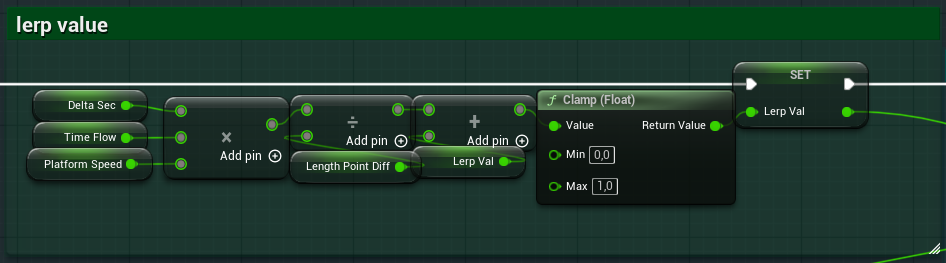 This looks very similar to how I showed it before, because it is fairly the same.
There is a variable that I haven't explained yet but I will do so here; Time Flow.
Time Flow is a simple variable and it just controls in what direction the platform will be moving.
To be clear this existed on both the versions of the platforms.
Let me also show creating a platform and its points is different in Entropy proper compared to Entropy 1.
This is a simple spline that sits on the platform. My system is built around the fact that we have splines in this engine.
I think using splines for these made the platforms not just better but also easier to work with.
Now I would say that there are 2 new things that are on these platforms compared to their older counterpart.
1. Rumble
2. Debug Tool
Let's start with
The rumble worked in two places, as shown in the video they worked once the platform was activated but also once the platform was deactivated.
The other place was *between certain points*, basically the designers could pick two points and then tell the platform to rumble there and on which axis they wanted to rumble on.
There were 2 functions, well a function and a macro, that made this system work.
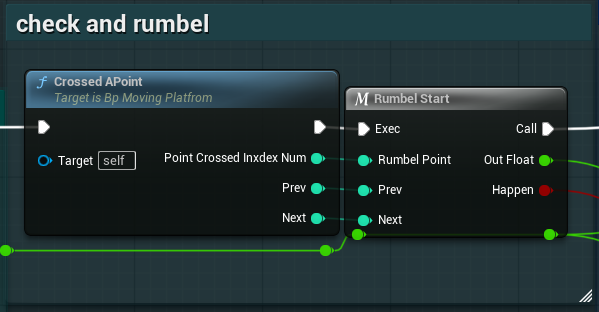 Crossed APoint; the platform had just crossed and which one was next.
Rumble Start; which handles slowing or speeding up the platform and tells the function that sets the position of the platform that it should apply the rumble effect.
Let's look a bit closer at Crossed APoint
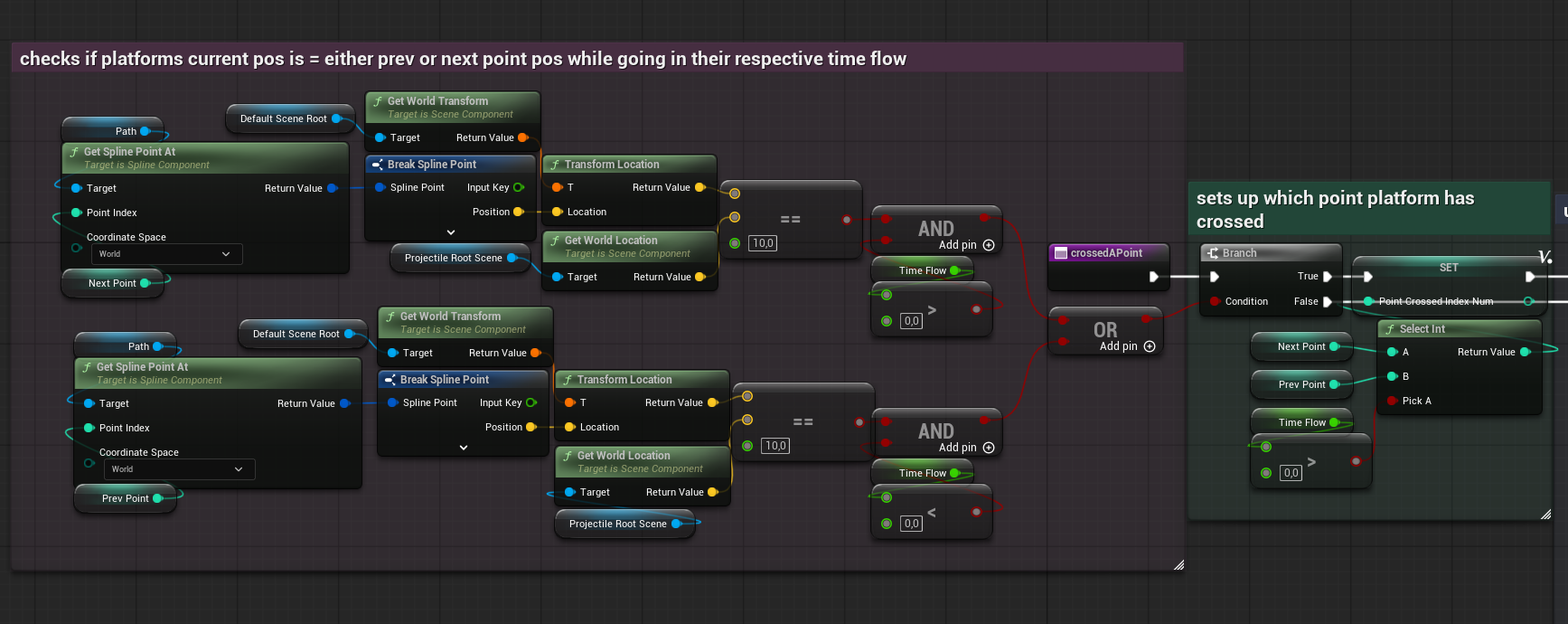 As we enter this function we start with an if statement. Now this looks like a lot, well kinda is.
See you cant just get your current position in the spline and be good. There is no way of knowing which spline points you are between. So I had to make the functionality somehow.
I came up with this;
Get the next/previous point, transform this point into world space even though you already are getting the point in world space. Dont ask splines in unreal are ehem *unreal*.
Compare this position to the platform's worldspace position, with some wiggle room.
and then just check if the Time Flow is flowing in the direction where next would be next and previous would be previous.
This has to be done both ways. Because depending on what way in “time” you are traveling the point you crossed could have been either your next or your previous point.
If either of these are true then we set up which point we crossed using a select node, again selecting based on Time Flow.
Now this is a lot just to get the correct point the platform just crossed but it's also the simplest way I could think of.
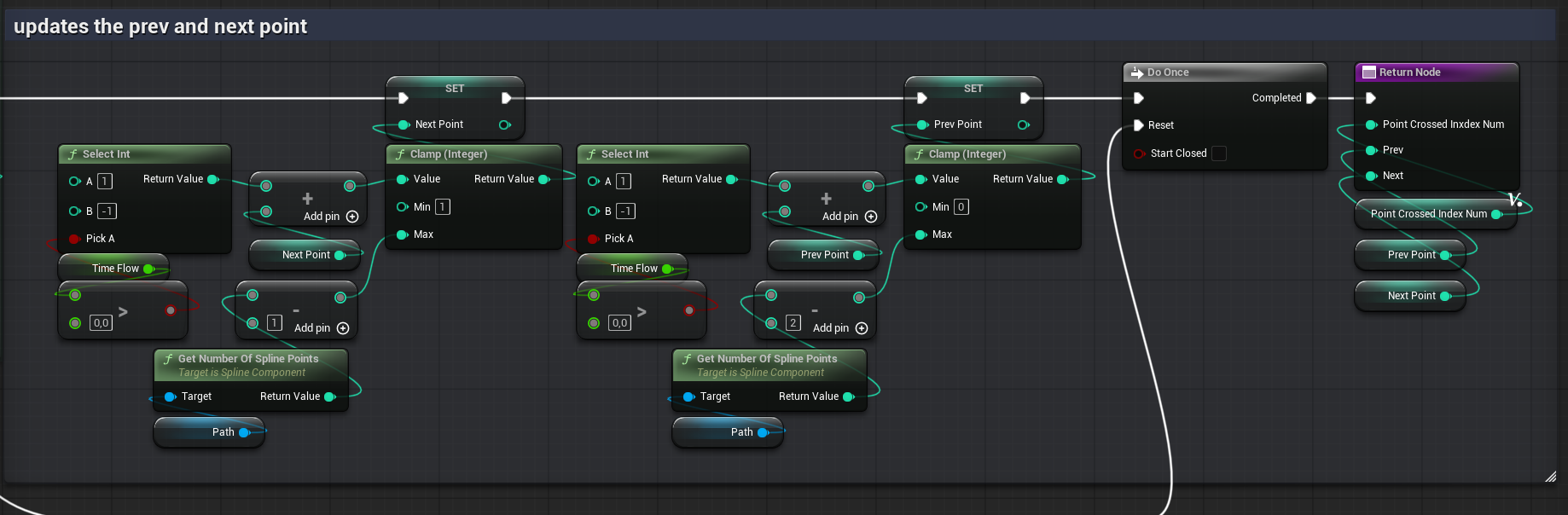 Then we just set the next and previous point based on the Time Flow. With some redundancies to make sure this doesn't explode.
Both which points we are between and what point we just crossed gets put out here. That all then goes into Rumble Start.
 This function looks odd but lets go step by step with what it does.
The first part is just a check to see if we should be rumbling between these points or not.
If we aren't then we set the speed of the platform to be the platform the designers wanted.
But say we do want to rumble here, then we set the speed to be the rumble speed, a custom value the designers can set.
We also get out a value called strength but that is used somewhere else.
In here we are just flipping that strength from its positive to its negative counterpart.
So why was it made like this? Well it was a patch work solution.
It was something the designers asked for, I made quickly and then well it was never really used inside of the game outside of at the activations and deactivation of the platforms.
So I saw no reason to make this better while I was working on the game.
If I were to improve these functions now I would probably not do much.
I would rename some variables and fix the input and output to be clearer.
I would also add some more gaps between the nodes, especially where the paths split.
But where does this all lead, well this all goes into the function that handles position and rotation of the platforms using the time lerp from before but also applies the rumble effect to the platforms.
The name of this function is RotSelection, which I just flat out bad.
It should be called something like “SetRotAndPos” instead but that's hindsight.
It looks like this in the start.
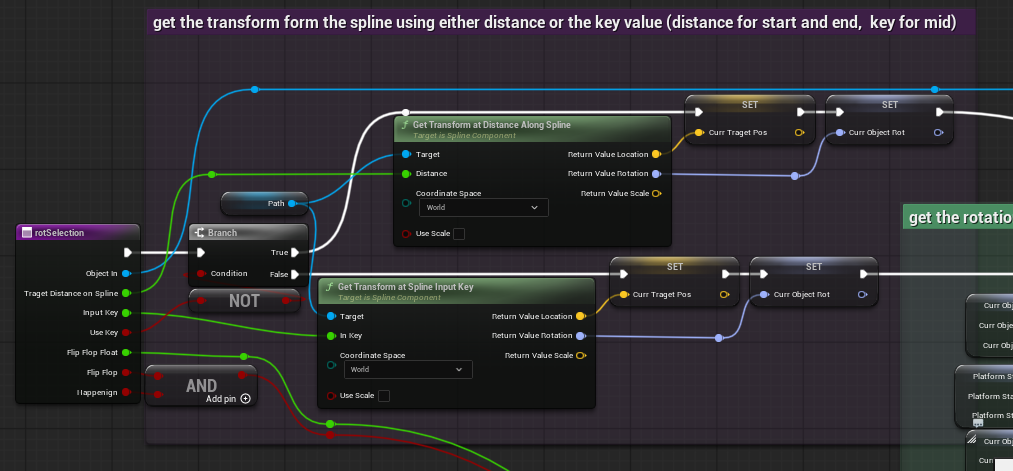 First part here is a simple question, is this using the distance or key to get the rotation and position at this point.
This function was made to handle both at the same time.
This I am fine with but it is a mess to look at so I could have spaced and structured this better.
From either the distance or the key we get the target position and rotation.
But this only talks about the first 4 variables really, so what about the Flip Flop, Flip Flop Float and Happening.
Well they are the variables used for the *rumble* effekt.
Flip Flop and Happening just tells the function that the effect should be applied.
Flip Flop Float was the strength from earlier.
Now the next step
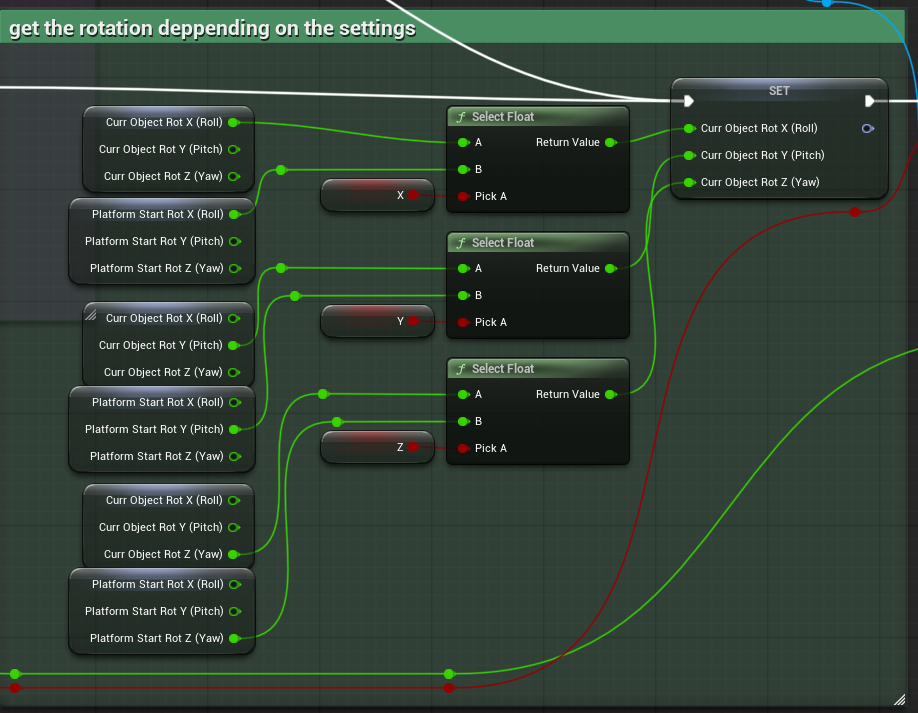 This is just me overriding the target rotation with the platform rotation depending on if the designers want the platform to be able to rotate or not.
They pick which axis and this just grabs what is needed.
NOTE: Splines are weird and seem to work with radiance as they will freak out and flip the platform if you try to rotate it too much in a direction.
If we don't rumble we just set the platform's position to be equal to the target.
If we do have a rumble we shake the platform by adding to its position on a given axis.
The axis is picked from an enum.
The strength comes from before.
NOTE: that the platform has two objects, the collider you stand on and the visual part. Rumble only affects the visual and not the stand on collider.
That's it for the rumble.
I think this is fine.
I mean I can definitely do it better then how I did.
Especially with how spaghetti this all looks. Again my naming has been off.
I could also have had the strength be calculated here along with the speed.
Splitting them like I did seems unnecessary.
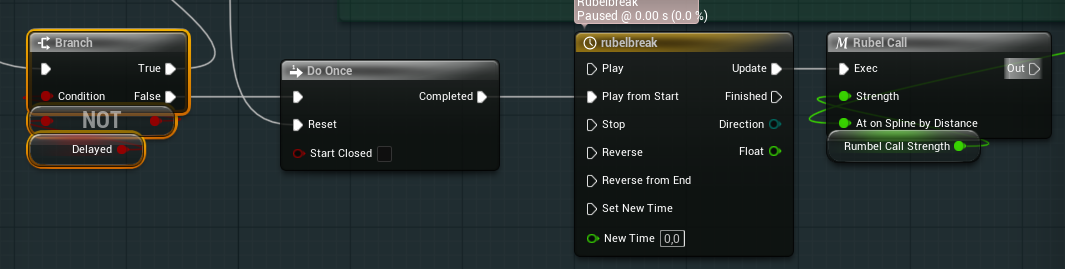 This is how we call the rumble effect on activation.
It's just a timeline going into a function that does basically the same as what you've just read.
Now lets look at the debug thingy I made for the platforms.
This one is simple but useful, it's a function called inside of the construction graph.
Meaning this happens every time this is constructed.
This is really useful, all be it not great on performance, because that means we can make the debug boxes “move” by creating and destroying them as everytime we move the spline.
I should have just moved the already made ones as needed, storing a pointer to them along with their input key.
And then create more points or destroy points as points get added or removed from the spline.
Now that I've shown what it does let me actually show the how.
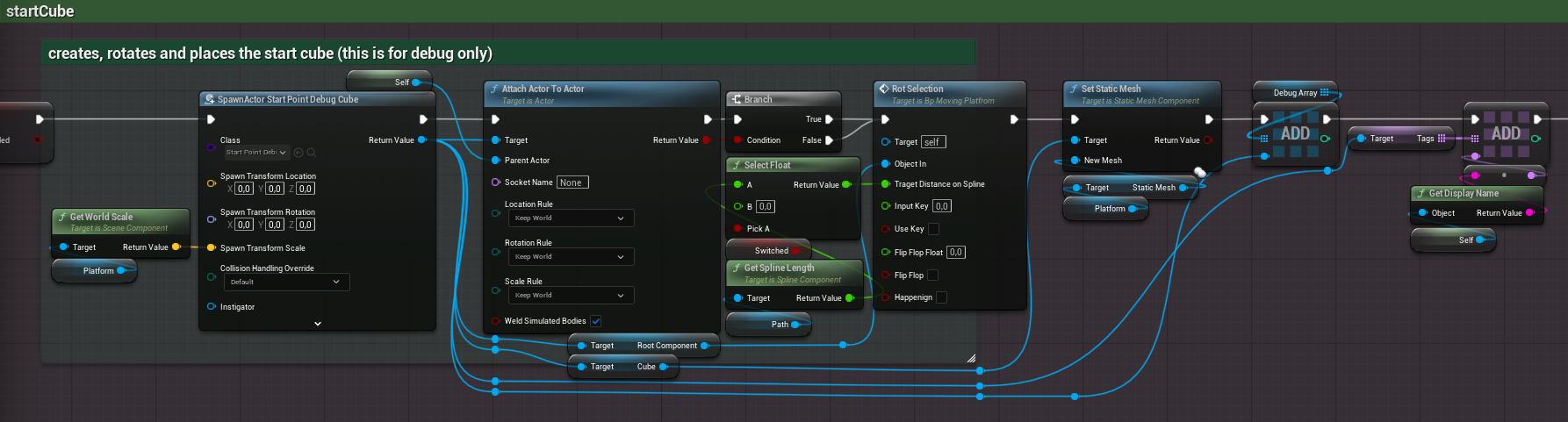 This is how we set up a cube, all of them are actors that have their own custom material.
We attach the debug cube to the platform and then use the RotSelection function to set its position and rotation.
This will automatically get the same settings as the platform would have at that point.
We then set its mesh to be that of the platform, meaning that this adapts depending on what mesh the platform has.
We add this to an array that we use later to delete all of these and we also add a tag on them as a backup.
This is done for every cube, start and end are different but that is purely visual as they get a different material.
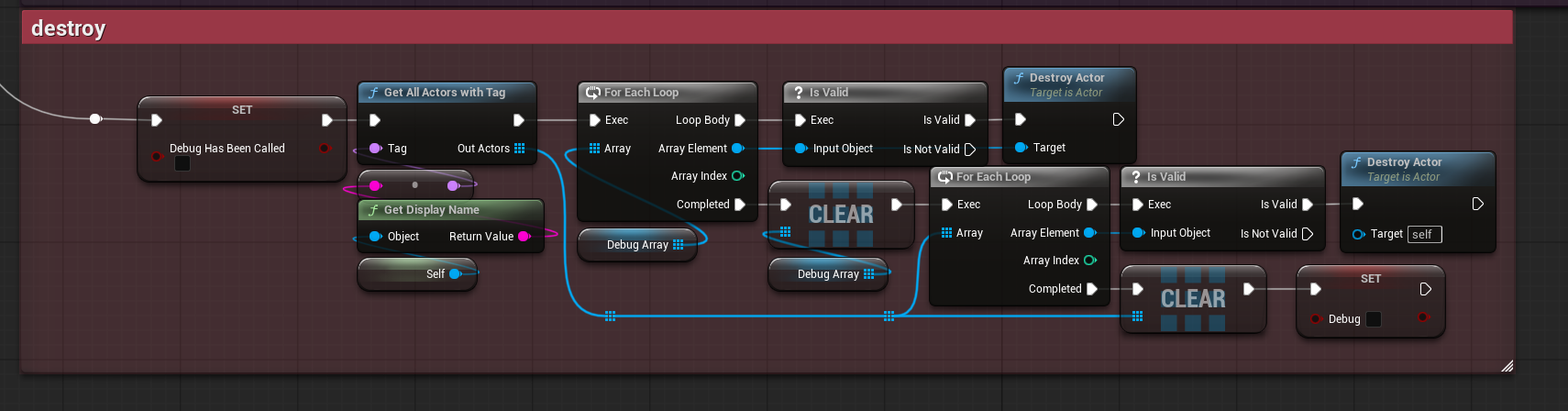 Destroy looks like this, we use both the tags and the array to make sure that we are deleting all the cubes.
NOTE: there is a bug where if you spam Create Debugs Cubes it can break.
I fixed this by creating a master destroyer, which gathers all actors by their tag and destroys them.
That's it, that's how these work.
Its simple but works.
If I were to make it now I dont know what I would imporove that isnt just the bug I mentioned.
There is a variable that I haven't explained yet but I will do so here; Time Flow.
Time Flow is a simple variable and it just controls in what direction the platform will be moving.
To be clear this existed on both the versions of the platforms.
[T]
Time Flow :
I think using splines for these made the platforms not just better but also easier to work with.
Now I would say that there are 2 new things that are on these platforms compared to their older counterpart.
1. Rumble
2. Debug Tool
Let's start with
Rumbel
The other place was *between certain points*, basically the designers could pick two points and then tell the platform to rumble there and on which axis they wanted to rumble on.
Rumble Start; which handles slowing or speeding up the platform and tells the function that sets the position of the platform that it should apply the rumble effect.
Let's look a bit closer at Crossed APoint
See you cant just get your current position in the spline and be good. There is no way of knowing which spline points you are between. So I had to make the functionality somehow.
I came up with this;
Get the next/previous point, transform this point into world space even though you already are getting the point in world space. Dont ask splines in unreal are ehem *unreal*.
Compare this position to the platform's worldspace position, with some wiggle room.
and then just check if the Time Flow is flowing in the direction where next would be next and previous would be previous.
This has to be done both ways. Because depending on what way in “time” you are traveling the point you crossed could have been either your next or your previous point.
If either of these are true then we set up which point we crossed using a select node, again selecting based on Time Flow.
Now this is a lot just to get the correct point the platform just crossed but it's also the simplest way I could think of.
Both which points we are between and what point we just crossed gets put out here. That all then goes into Rumble Start.
The first part is just a check to see if we should be rumbling between these points or not.
If we aren't then we set the speed of the platform to be the platform the designers wanted.
But say we do want to rumble here, then we set the speed to be the rumble speed, a custom value the designers can set.
We also get out a value called strength but that is used somewhere else.
In here we are just flipping that strength from its positive to its negative counterpart.
So why was it made like this? Well it was a patch work solution.
It was something the designers asked for, I made quickly and then well it was never really used inside of the game outside of at the activations and deactivation of the platforms.
So I saw no reason to make this better while I was working on the game.
If I were to improve these functions now I would probably not do much.
I would rename some variables and fix the input and output to be clearer.
I would also add some more gaps between the nodes, especially where the paths split.
But where does this all lead, well this all goes into the function that handles position and rotation of the platforms using the time lerp from before but also applies the rumble effect to the platforms.
The name of this function is RotSelection, which I just flat out bad.
It should be called something like “SetRotAndPos” instead but that's hindsight.
It looks like this in the start.
This function was made to handle both at the same time.
This I am fine with but it is a mess to look at so I could have spaced and structured this better.
From either the distance or the key we get the target position and rotation.
But this only talks about the first 4 variables really, so what about the Flip Flop, Flip Flop Float and Happening.
Well they are the variables used for the *rumble* effekt.
Flip Flop and Happening just tells the function that the effect should be applied.
Flip Flop Float was the strength from earlier.
Now the next step
They pick which axis and this just grabs what is needed.
NOTE: Splines are weird and seem to work with radiance as they will freak out and flip the platform if you try to rotate it too much in a direction.
If we do have a rumble we shake the platform by adding to its position on a given axis.
The axis is picked from an enum.
The strength comes from before.
NOTE: that the platform has two objects, the collider you stand on and the visual part. Rumble only affects the visual and not the stand on collider.
That's it for the rumble.
I think this is fine.
I mean I can definitely do it better then how I did.
Especially with how spaghetti this all looks. Again my naming has been off.
I could also have had the strength be calculated here along with the speed.
Splitting them like I did seems unnecessary.
It's just a timeline going into a function that does basically the same as what you've just read.
Now lets look at the debug thingy I made for the platforms.
Debug
Meaning this happens every time this is constructed.
This is really useful, all be it not great on performance, because that means we can make the debug boxes “move” by creating and destroying them as everytime we move the spline.
I should have just moved the already made ones as needed, storing a pointer to them along with their input key.
And then create more points or destroy points as points get added or removed from the spline.
Now that I've shown what it does let me actually show the how.
We attach the debug cube to the platform and then use the RotSelection function to set its position and rotation.
This will automatically get the same settings as the platform would have at that point.
We then set its mesh to be that of the platform, meaning that this adapts depending on what mesh the platform has.
We add this to an array that we use later to delete all of these and we also add a tag on them as a backup.
This is done for every cube, start and end are different but that is purely visual as they get a different material.
NOTE: there is a bug where if you spam Create Debugs Cubes it can break.
I fixed this by creating a master destroyer, which gathers all actors by their tag and destroys them.
That's it, that's how these work.
Its simple but works.
If I were to make it now I dont know what I would imporove that isnt just the bug I mentioned.
Freezing Platforms In Entropy
It is just move intill the player interacts with it. Thats why is called freezing platfrom.
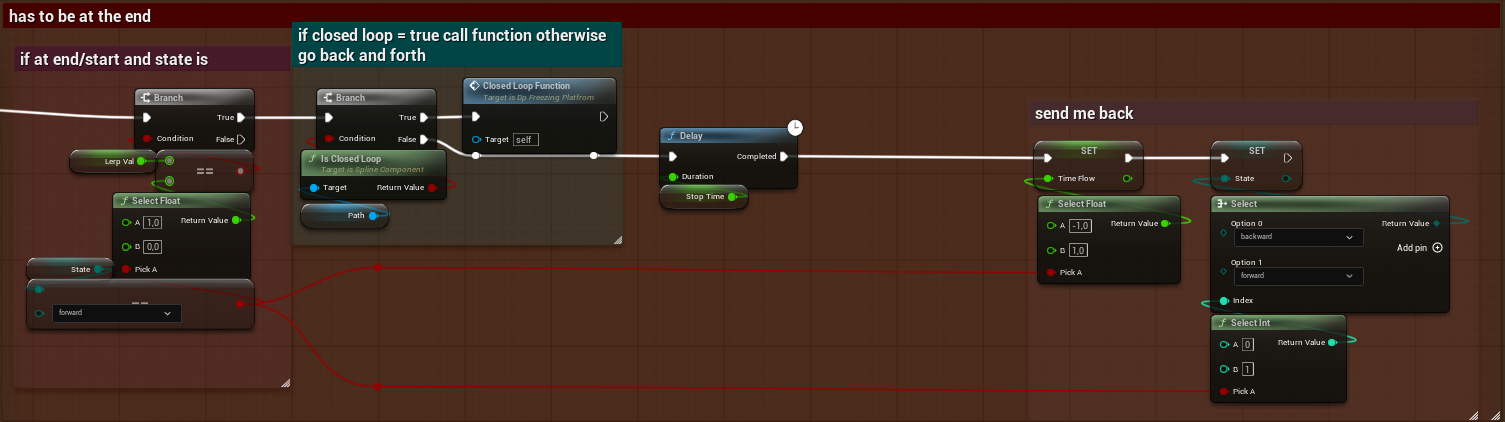
If the spline is an open spline then we just pasuse it for a secound then send it back but if its a closed loop.
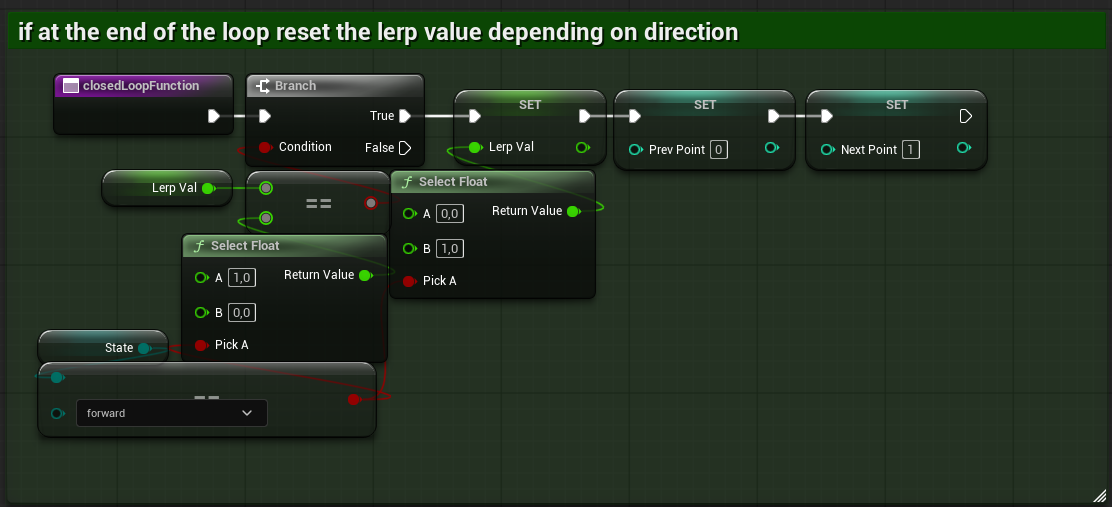
Creating the loop effect.
Vine Generator
This was my attempt to make a vine generator for fun basically. We ran low on work so when I was bored and had some free time I would just work on this.
All the programmers did this and thats how we got the *bugs* you can see in entropy into the game.
So good thing came out of it in the end.
Does this spline generator work? no. Splines are werid, it was really hard to understand how to add points to them in the correct space.
That was me last week I just made it work.. so from this on this is the *improved* verstion.
now for the best part the *code*
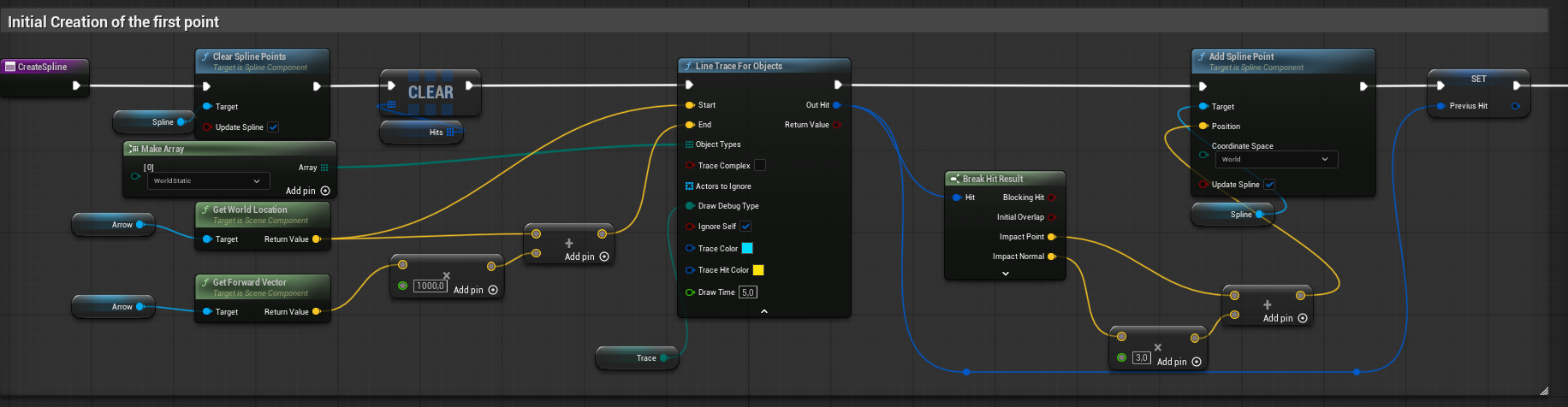 First we need to make sure that the spline doesnt have any points so we clear it out.
Then we cast a line forward from the actor, the red arrow in this case. We use the hit point to spawn a spline point slightly above the impact point.
We store this point for later in Previus Hit.
 Here we calcualte the degrees we want to fire at later when we are checking for more places to potanialy place a point.
This will be reused a lot so instead of recreating the same math each time we want to check for points we just do it once and add it to an array called Array of Degrees
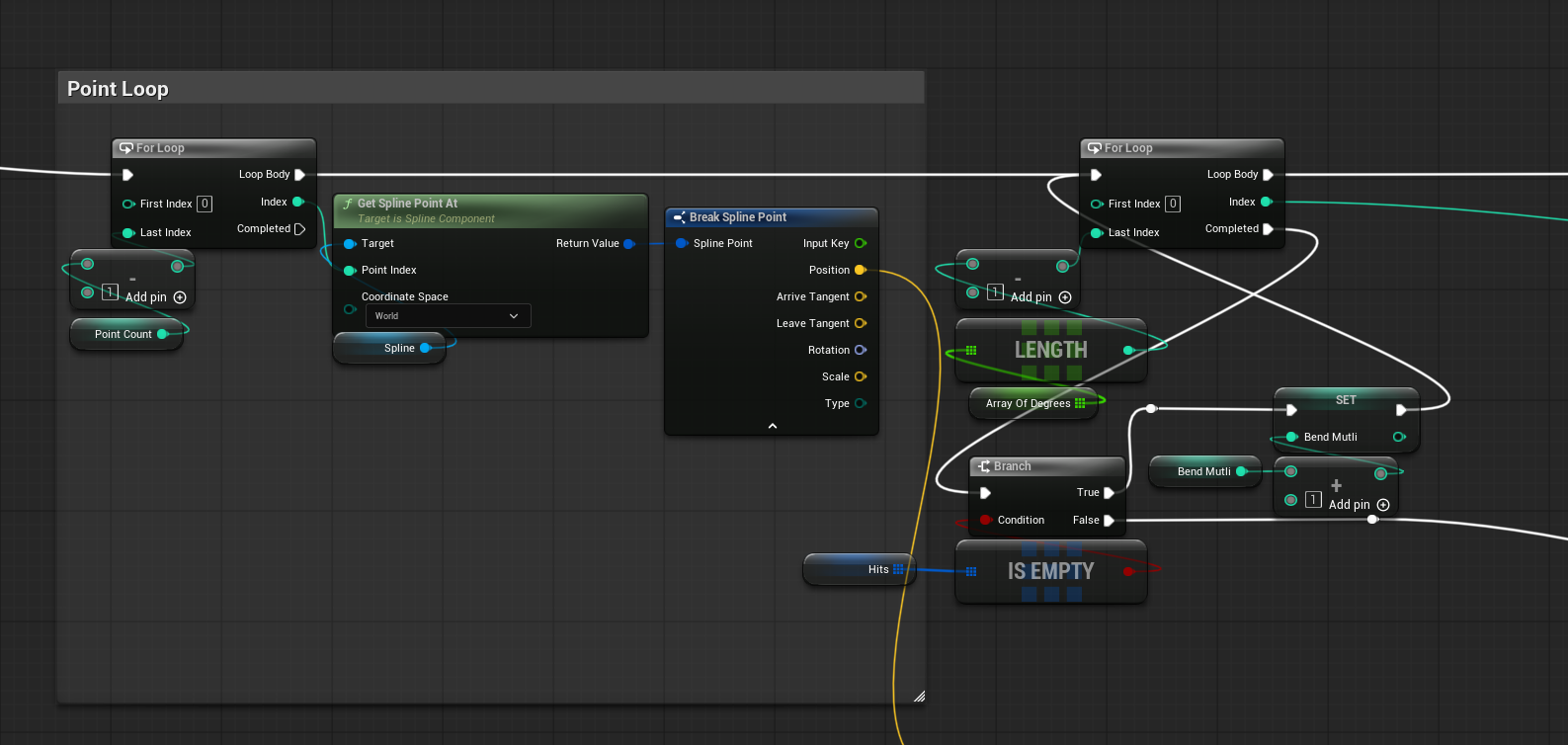 Here we set up the first loop, this one is just per point we want to make.
We use the index from the loop to get the spline point, this will always be the lates spline point made. In this case the one we just made nummber 0.
We have to use its postion for later so lets call that IndexPos for simplisty of reading.
the loop after looks odd but ill explain it, this is where we fire out in a cake slice of degrees to check where we can place a point.
The stuff bellow it is just a check to see if we hit something or not if we didnt we try again but with a little difference.
For now just remeber Bend Mutli.
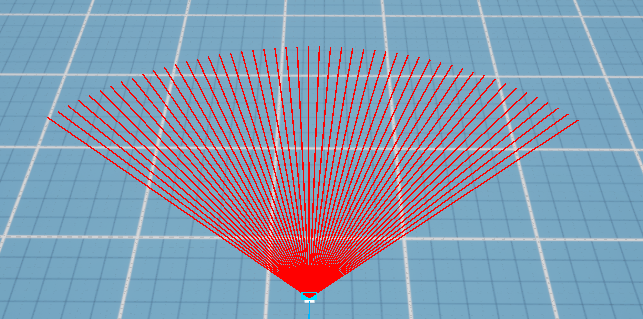
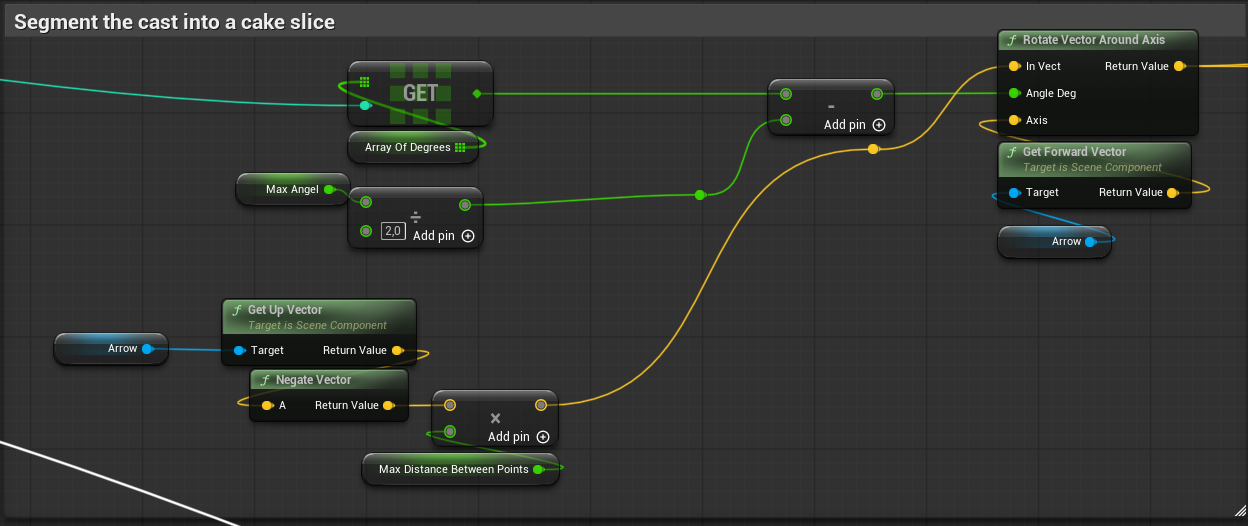 Here we use the Array of Degrees and the Max angle
to rotate the end point in this, soon to be, line trace around the arrows forward vector to split them into a cake slice shape that can be bigger or smaller deppending on settings.
Here we use the Array of Degrees and the Max angle
to rotate the end point in this, soon to be, line trace around the arrows forward vector to split them into a cake slice shape that can be bigger or smaller deppending on settings.
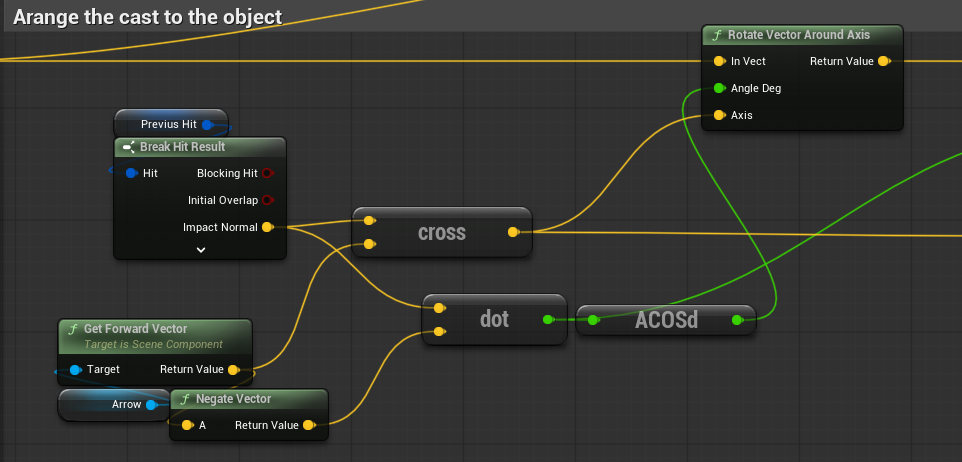 After we have made the cake slice we angle it so that its flush with the object we have hit so we can find the next spline point.
We do this by taking the Previus Hit impact normal and corssing it with the forward vector of the arrow, this create a right vector for use to roate around.
We calcualte how much we need to roate by taking the impact normal and a negated forward of the arrow and doting them, take this dot prodoct and put it into ACOSd which returns us the degrees we need to rotate by.
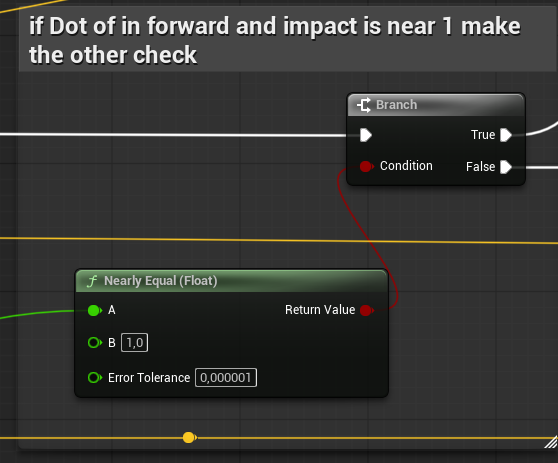
This does have a problem tho if the dot prodoct is near or equal to 1 then the calcualtions we are going to do after all break so we need this branch statement (if) to just make sure we use a different math if this is true.
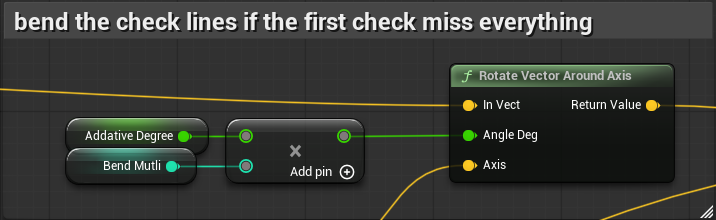 Here is where the Bend Mutli again and here is where it is used. See the bend multi bends end point of the rays towards the object that the
Previus Hit gives us.
Here is where the Bend Mutli again and here is where it is used. See the bend multi bends end point of the rays towards the object that the
Previus Hit gives us.
We do this by using the eariler cross product. Then bend multi only goes up if we fail to hit anything so here we shit the rays over and over and over until we have a cake slice that is a hit slice.
after this we actually fire the ray and if they hit something we add it to an array of hits.
Remeber the part where I talked about how if the dotproduct is to close to 1 we need to think diffrently well here it is.
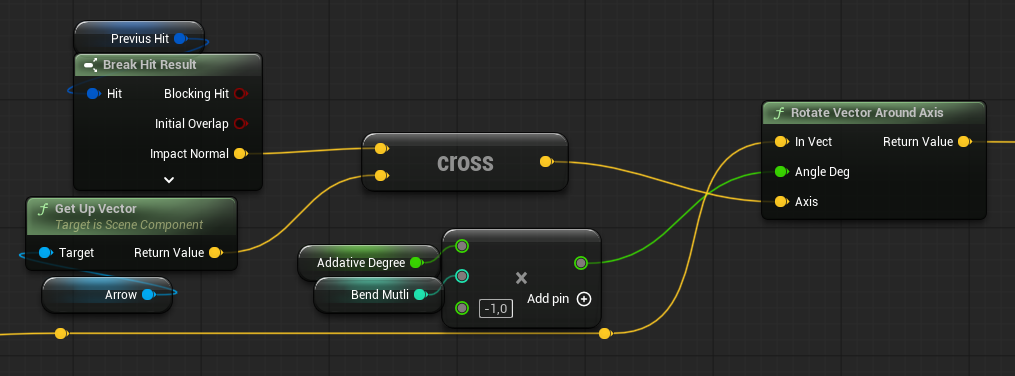 This skips doint the dot rotation becouse this 1 dot issue is not rare but is predicatable so we can fake it.
This rotates the fire around right vector relative to the impact
See the dot being equall to 1 means that the impact normal and the forawrd of the actor is the same and that breaks things when we cross them.
So we instead use the up vector and the impact normal crossing them to create a right vector.
We use this right vector to rotate the lines instead making the shake fallow the object like this.
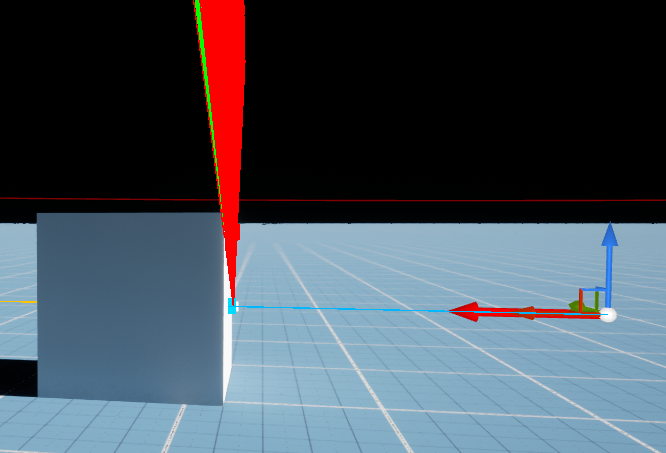 now we can go up this straight impact point.
 Lastly we take a random hit to make a spline point and reset all the needed values to make a new one.
So good thing came out of it in the end.
Does this spline generator work? no. Splines are werid, it was really hard to understand how to add points to them in the correct space.
That was me last week I just made it work.. so from this on this is the *improved* verstion.
Then we cast a line forward from the actor, the red arrow in this case. We use the hit point to spawn a spline point slightly above the impact point.
We store this point for later in Previus Hit.
This will be reused a lot so instead of recreating the same math each time we want to check for points we just do it once and add it to an array called Array of Degrees
We use the index from the loop to get the spline point, this will always be the lates spline point made. In this case the one we just made nummber 0.
We have to use its postion for later so lets call that IndexPos for simplisty of reading.
the loop after looks odd but ill explain it, this is where we fire out in a cake slice of degrees to check where we can place a point.
The stuff bellow it is just a check to see if we hit something or not if we didnt we try again but with a little difference.
For now just remeber Bend Mutli.
We do this by taking the Previus Hit impact normal and corssing it with the forward vector of the arrow, this create a right vector for use to roate around.
We calcualte how much we need to roate by taking the impact normal and a negated forward of the arrow and doting them, take this dot prodoct and put it into ACOSd which returns us the degrees we need to rotate by.
This does have a problem tho if the dot prodoct is near or equal to 1 then the calcualtions we are going to do after all break so we need this branch statement (if) to just make sure we use a different math if this is true.
We do this by using the eariler cross product. Then bend multi only goes up if we fail to hit anything so here we shit the rays over and over and over until we have a cake slice that is a hit slice.
after this we actually fire the ray and if they hit something we add it to an array of hits.
This rotates the fire around right vector relative to the impact
See the dot being equall to 1 means that the impact normal and the forawrd of the actor is the same and that breaks things when we cross them.
So we instead use the up vector and the impact normal crossing them to create a right vector.
We use this right vector to rotate the lines instead making the shake fallow the object like this.